
Project tour
A full project introduction from the agent's clip, in 6 beats
Turn one phone clip of a sales agent presenting one project (1 to 5 minutes) into a 45-75 second vertical sales short (1080x1920) that walks through the whole project.
Important: this is a skill for terminal AI coding agents (Claude Code, Codex) that runs on your own computer. It is not a prompt for the ChatGPT website. Check the requirements below before buying.
What it makes
The agent cuts the clip word by word, applies a warm cinematic grade, and cuts the presenter out so they stand on the project render while big two-colour words type in letter by letter.
The story of the video
Six beats in a fixed order. A beat is skipped when you have no material for it.
- Hook: the presenter on the project render, with 2 to 4 big words.
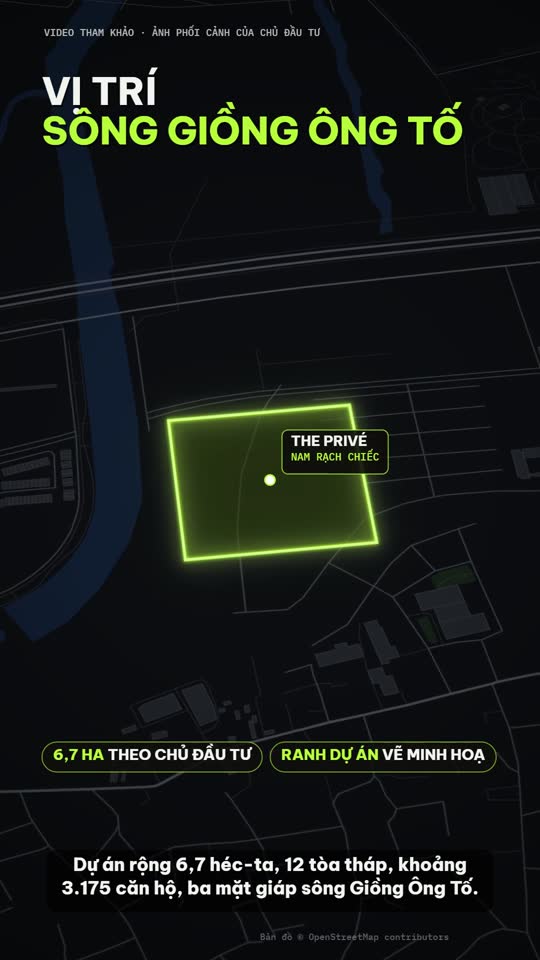
- Location: a satellite map with routes drawn on the places the presenter names.
- Amenities: two-tier keywords with neon icons, or map callouts.
- Policy: a poster with 1 to 2 offers and up to 4 rows, built from the developer's numbers.
- Scale and travel: black panels with a logo, a picture band and a neon number.
- Call to action: a phone pill on the closing line, with your watermark all along.
How it works
Open your agent and type:
Dựng short giới thiệu full dự án từ clip môi giới sale.mp4 và ảnh trong thư mục assets, 60 giâyThe agent asks at most three things: the project name and which material may appear on screen, the hotline and watermark name, and the target length. It then transcribes, cuts, grades, builds and renders.
Nothing invented
- No price, policy, date, area, distance or travel time appears unless the presenter says it in the clip or it comes from a source you gave. Estimates and illustrations are labelled. No data means no poster.
- Third-party photos carry a credit. Developer material is used only when you own it or were given it.
- Satellite tiles such as Esri World Imagery are for internal demos only; a video you publish or sell needs tiles whose licence allows it.
- QR codes, bank details and customer data in your material are blurred before the build.
- No AI video, no generated faces, no GPS or coordinates on screen.
What you get
- One vertical MP4, a QA report, and a summary of every number on screen with its source and every photo credit.
- An optional effects layer (price, area and other moments), using figures from your brief only.
What you need
- Claude Code or Codex CLI.
- Python, with a virtual environment that has OpenCV.
- Speech-to-text runs on Soniox, a cloud service.
Install and make your first video
Copy the skill folder into your skills folder:
~/.claude/skills/talkinghead-bds-project-video/For Codex, use ~/.agents/skills/talkinghead-bds-project-video/. Then type a request like the one above.
Who it is for
A real-estate sales agent who has a clip presenting one project and wants a full-project sales short from it.
Not a fit if you want
- A faceless listing with no presenter.
- To cut a general talk that is not about one project.
Frequently asked questions
Can I change the order of the beats?
No. The story is locked. You choose the target length and which beats have material.
Can I use the videos commercially?
Videos you render are yours for any commercial use. You may not resell, redistribute or share the skill files.
More looks from Real Estate Promo
Full set: Real Estate Promo
2 looks
 Included in ReelCrew
Infrastructure route
Metro and highway routes on a satellite map
 Included in ReelCrew
Location map
Project photos plus an OSM location map, routes and amenities

Sales short
The agent's clip with project photos shown on the exact spoken words
 Included in ReelCrew
Trip listing
An apartment plus one trip to a destination on the map
Start with one look, step up when you need more
Related looks

App launch studio
An app launch: a question plus a demo on a 3D laptop

Farm market
Sell farm produce and local specialties from phone photos

Keynote launch
A keynote-style launch with frosted-glass cards on indigo
Product demo
A feature short from real demo footage plus 1-3 claims

Product promo
A shop's product range cut to the beat of the music

Site launch
A website launch with a magazine-style interior theme